Picture this: six months after a contract is signed, the other party claims they never agreed to the payment terms in Section 4. You know they signed it. You watched them sign it. You have a copy of the signed PDF sitting right there in your inbox. But they're insisting the document was altered after signing, or that someone else signed on their behalf, or that the date is wrong. Now what?
If you signed that document on paper, you have the mark on the page. That's it. Proving exactly when it was signed, who had access to it beforehand, whether any changes were made — all of that requires witnesses, forensic handwriting analysis, or other expensive, slow means of investigation.
If you signed it electronically through a platform that generates a proper audit trail, the dispute is over in minutes. You pull up the audit log: the exact timestamp of every action on the document, the IP addresses of everyone who accessed it, a cryptographic fingerprint proving nothing was altered after signing, authentication records showing who unlocked the signing link. The dispute evaporates because the evidence is unambiguous.
That difference — between "I have a signed copy" and "I have a complete verified record of every action on this document" — is what a document audit trail provides. It's one of the most underappreciated features of electronic document signing, and for businesses that regularly deal with contracts, agreements, and regulatory documents, it's one of the most valuable.
What Is a Document Audit Trail?
A document audit trail is a chronological, tamper-evident log of every significant action taken on a document throughout its lifecycle. It records what happened, when it happened, who was involved, and from where — creating a transparent chain of custody that can be reviewed at any point.
The concept of the audit trail is not new. Accounting has maintained audit trails for centuries — ledger entries showing every transaction, every adjustment, every correction, all in sequence so that any discrepancy can be traced back to its source. The same principle applied to documents means every view, every edit, every send, every signature, and every download is logged in an immutable record that nobody — not the sender, not the recipient, not even the platform itself — can retroactively alter.
In the context of electronic document signing, an audit trail typically begins the moment a document is uploaded to the platform and continues through the entire signing process, ending when all parties have signed and the final, sealed copy has been distributed. Some platforms extend the trail even further, logging every time the completed document is accessed or downloaded from storage.
The key characteristic that makes an audit trail genuinely valuable — as opposed to just a log — is tamper-evidence. Any competent logging system can record events. But a log that can be edited after the fact is worth very little as evidence. A proper document audit trail uses cryptographic techniques to ensure that the log cannot be altered: typically by hashing each log entry and chaining those hashes together, so that any change to a past entry would break the chain and become immediately detectable.
This tamper-evidence transforms the audit trail from a helpful record into a legal-grade piece of evidence. Courts, regulators, and dispute resolution bodies routinely accept electronic audit trails as evidence because the cryptographic proof of integrity is verifiable independently of the platform that generated it.
It's also worth distinguishing a document audit trail from a simple version history. Version history records changes to the content of a document — what the text said before and after edits. An audit trail records everything else: who accessed the document, when, what they did, and what the state of the document was at each moment. Both are useful, but for signing and legal compliance purposes, the audit trail is the more critical of the two.
The practical applications span virtually every industry. A law firm uses audit trails to prove that a client reviewed and signed a retainer agreement at a specific time. A healthcare provider uses them to demonstrate that patient consent was obtained before a procedure. A real estate company uses them to prove that a buyer had access to all disclosures before the purchase agreement was signed. A financial institution uses them to comply with recordkeeping regulations and demonstrate that transactions were properly authorized.
In all of these cases, the audit trail does something that paper simply cannot: it provides an independent, verifiable record of the signing process that exists separate from the signed document itself.
What Information Does an Audit Trail Capture?
The specific data captured in a document audit trail varies between platforms, but a comprehensive audit trail should capture all of the following categories of information.
Document creation and upload. The audit trail begins before the signing process. It records when the document was first created or uploaded, who created it, what the file was (filename, file type, file size), and a cryptographic hash of the original document. This hash — typically a SHA-256 value — serves as a fingerprint: if the document's contents change even by a single character, the hash changes, and the discrepancy is recorded.
Configuration and setup. When the sender adds signature fields, sets up signer roles, configures authentication requirements, and specifies the signing order, all of those actions are logged. This creates a record of what was required of each signer before the signing event began.
Document distribution. When the signing link or invitation is sent to each signer, the audit trail records the timestamp, the recipient's email address, and the method of delivery. For platforms that send SMS notifications or access codes, those sends are logged as well.
Document access. Every time a signer opens the document — whether they sign it on that session or not — the access event is recorded. This includes the timestamp, the signer's IP address, the browser and operating system they used, and the device type. Some platforms also capture geolocation data based on the IP address, though this is less precise than GPS and should be understood as an approximation.
Authentication events. If the platform requires authentication before allowing the signer to access the document — whether by email link, access code, knowledge-based authentication, or ID verification — each authentication attempt and result is logged. This is critical: it establishes not just that someone opened the document, but that they authenticated as the intended signer before doing so.
Signature events. The moment each signature is applied is recorded with full precision: the timestamp (to the second or millisecond), the signer's IP address at the moment of signing, the signature field that was completed, and any other fields completed in the same session. If a signer initials pages as well as signing the final page, each initials event is separately logged.
Document completion. When the last required signature is applied, the platform records the completion event and generates the final, sealed document. The seal typically involves computing a new cryptographic hash of the completed document — which now includes all the signatures — and recording that hash in the audit trail. The hash of the signed document serves as proof that no changes have been made to the document after signing.
Document access after signing. Depending on the platform, subsequent accesses — when parties download the signed document, view it in the platform, or share it — may also be logged. This extends the chain of custody beyond the signing event itself.
Timestamps and timezone records. All timestamps in a comprehensive audit trail are recorded in a consistent timezone (typically UTC) and include the local timezone of each event for context. The precision of timestamps matters: a timestamp accurate to the second carries far more weight than one accurate only to the day.
All of this data is typically presented in a human-readable audit report that accompanies the signed document. If a dispute ever arises, you can produce the audit report alongside the signed PDF and demonstrate exactly what happened, step by step.
Why Document Audit Trails Matter Legally
From a purely legal standpoint, an audit trail does one fundamental thing: it converts a contested claim about a signing event into a verifiable, documented fact.
Consider the core elements that must be proven to establish the legal validity of a signed document. Under the Electronic Signatures in Global and National Commerce Act (ESIGN Act) and the Uniform Electronic Transactions Act (UETA), an electronic signature is valid if it reflects the signer's intent to sign and their consent to conduct the transaction electronically. If those elements are disputed, the burden falls on the party asserting validity to provide evidence.
Without an audit trail, "proving" those elements requires circumstantial evidence: the signed document exists, the signature appears on it, the signer had the ability to sign it. A determined adversary can find ways to challenge each of those facts — claiming the document was altered after signing, claiming they never received it, claiming someone else signed on their behalf.
With a comprehensive audit trail, the same elements can be proven directly:
- Intent to sign is established by the authentication records (the signer unlocked the signing link with their email or access code), the access records (they opened the document and scrolled through it), and the signature event record (they deliberately applied their signature to the designated field).
- Identity of the signer is established by the authentication records, the IP address logs, and the device information captured at the time of signing.
- Document integrity is established by the cryptographic hashes: the hash of the document before signing matches the original upload, and the hash of the document after signing can be recomputed from the final PDF and verified to match the audit trail's record.
- Timeline of events is established by the timestamped log, which can be presented in court as a continuous, unbroken record.
This is exactly why courts in the United States and internationally have been willing to admit electronic audit trails as evidence in contract disputes. The Federal Rules of Evidence recognize electronic records as admissible when accompanied by appropriate authentication — and a cryptographically verified audit trail from a reputable e-signature platform satisfies that authentication standard.
The legal value of audit trails extends beyond dispute resolution. In regulated industries, audit trails are often a compliance requirement in their own right — not just helpful evidence, but mandated records that must be maintained for specific periods. The FDA's 21 CFR Part 11 requires that electronic records in pharmaceutical contexts include audit trails showing the date and time of record creation and modification. HIPAA requires audit controls for electronic protected health information. SOX (Sarbanes-Oxley) requires financial records to be maintained with controls that prevent unauthorized alteration — which audit trails support directly.
For a broader look at how electronic signatures and their supporting evidence infrastructure meet legal validity requirements, our guide on whether electronic signatures are legally binding covers the statutory framework in depth.
People Also Ask
What is a document audit trail example?
A document audit trail is a timestamped log showing every action taken on a document. Here's what one looks like in practice:
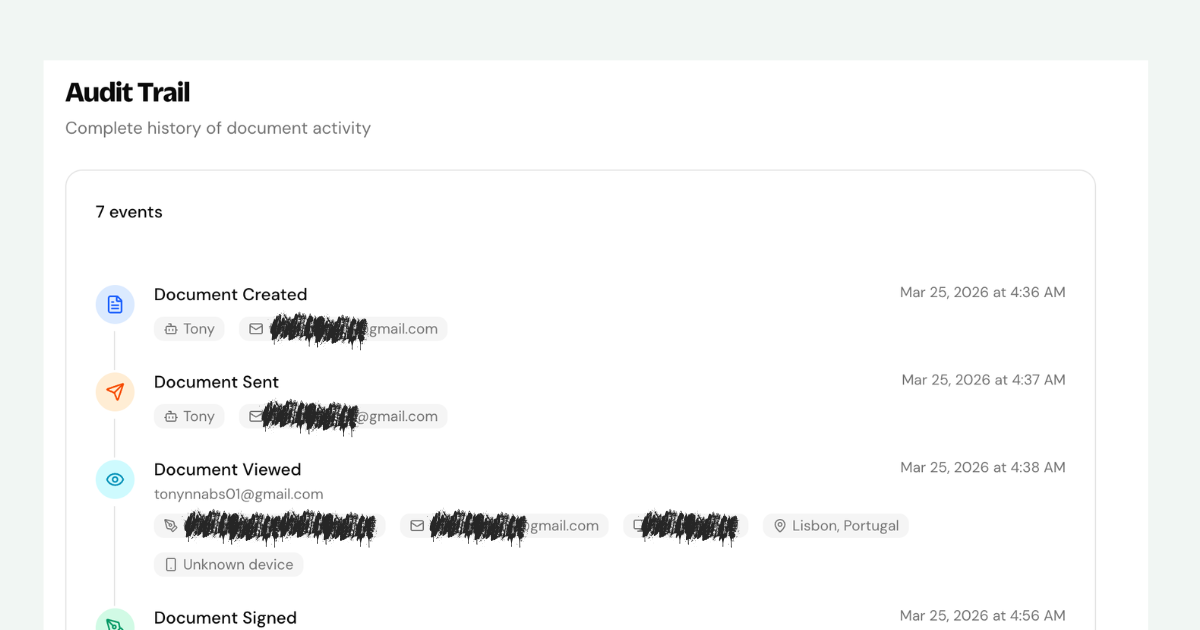
In a typical audit trail for an electronically signed contract, you would see entries like:
- 2026-06-28 09:14:22 UTC — Document created and uploaded by sender@company.com from IP 203.0.113.42
- 2026-06-28 09:15:01 UTC — Signing invitation sent to client@example.com
- 2026-06-28 10:32:17 UTC — Document opened by client@example.com from IP 198.51.100.7 (Chrome on macOS)
- 2026-06-28 10:33:44 UTC — Signature applied by client@example.com to field "Signer 1" from IP 198.51.100.7
- 2026-06-28 10:33:45 UTC — Document completed. Final document hash: a3f2b9d1...
Each entry captures who, what, when, and where — building a complete picture of the signing event that can be produced as evidence if the validity of the signature is ever questioned.
How Audit Trails Work in E-Signature Platforms
Understanding the mechanics of how electronic signature platforms generate and protect audit trails helps explain why they're so much more reliable than manual record-keeping.
Event capture. Every significant user action within the platform — opening a document, completing a field, clicking to sign, downloading the finished document — triggers an event that is captured and recorded by the platform's logging infrastructure. These events are captured at the server level, meaning they cannot be prevented or altered by anything the user does on their end. Even if a user closes their browser immediately after signing, the server has already recorded the signature event.
Timestamping. Each event is timestamped by the server at the moment it occurs, using coordinated universal time (UTC) as a reference standard. Some platforms use trusted timestamping services — third-party authorities that provide cryptographically signed timestamps — to add an independent verification layer beyond the platform's own clock. This matters because it prevents any question about whether the platform's internal clock could have been manipulated.
Cryptographic hashing. At key moments in the document lifecycle — after upload, after the final signature is applied — the platform computes a cryptographic hash of the document. The most common hash algorithm for this purpose is SHA-256, which produces a 64-character string that is uniquely derived from the document's exact contents. Change one word in the document and the hash changes completely. The hashes are recorded in the audit trail, allowing anyone with the final signed document to independently verify that it matches the hash in the trail — and therefore that it has not been altered.
Hash chaining. Advanced platforms link audit log entries together using hash chains, similar to the structure used in blockchain technology. Each log entry includes a hash of the previous entry. If any past entry is altered, the chain breaks, and the alteration is immediately detectable. This makes the audit trail itself tamper-evident, not just the document.
Audit certificate generation. When a signing workflow is complete, most platforms generate a human-readable audit certificate — a PDF that summarizes the audit trail in a presentable format. This certificate typically includes the names and email addresses of all parties, the document title, the timestamps and IP addresses for each signing event, and the document hash. It can be produced alongside the signed document in any proceeding where the validity of the signatures is at issue.
Long-term storage. The evidentiary value of an audit trail depends on its availability. Platforms typically store audit trails for the duration of the document's storage on the platform, and many enterprise-tier offerings allow export of the full audit trail data in structured formats (JSON, CSV) for integration with the organization's own records management systems. For documents with long legal retention periods — real estate records, healthcare consent forms, corporate governance documents — ensuring that audit trail data is preserved and accessible for the full retention period is an important consideration when choosing a platform.
Audit Trail vs. Version History: What's the Difference?
These two concepts are frequently confused, and the distinction matters in practice. Both track what happens to a document over time, but they track different things — and they serve different purposes.
Version history is a record of changes to a document's content. It tracks what the document said before and after edits: which paragraphs were added, which words were changed, which sections were deleted. Version history is the "what changed" record. It's enormously useful during the drafting phase of a document, when multiple people are editing and it's important to be able to revert to an earlier version, compare drafts, or understand the progression of negotiations.
Most word processors and document collaboration platforms — Google Docs, Microsoft Word Online, Notion — offer version history natively. It's a standard feature of any collaborative drafting environment.
Audit trail is a record of actions on a document, not changes to its content. It tracks who did what, when, and from where: who uploaded the document, who sent it for signing, who opened it, who authenticated, who signed, when the signing was completed. Audit trails are most relevant after the drafting phase is over — once the document's content is final and the signing process begins.
The key difference in purpose:
- Version history answers: What did this document look like at previous points in time? What changes were made between version 3 and version 4?
- Audit trail answers: Who signed this document? When did they sign it? From where? Was the document altered after signing? Can we prove they accessed it before signing?
These are fundamentally different questions, asked at different points in a document's lifecycle, for different reasons.
In practice, the two are complementary rather than competing. A well-run document workflow uses version history during drafting to track collaborative editing, then transitions to an audit-trail-generating signing platform for the execution phase. Together, they provide a complete record from first draft to final signed agreement.
One important nuance: some e-signature platforms offer a limited form of version tracking for the pre-signature phase — logging changes made to the document before it's locked for signing. This is a bridge between the two concepts, but it's not a substitute for either dedicated version control during drafting or a comprehensive audit trail during signing.
For organizations dealing with documents that go through lengthy negotiation and revision — complex commercial contracts, for example — maintaining clear separation between the "drafting record" (version history) and the "execution record" (audit trail) keeps both types of evidence clean and independently verifiable.
Industries Where Audit Trails Are Required or Critical
While every business benefits from having a verifiable record of its signing events, certain industries face specific regulatory requirements or liability environments that make audit trails not just helpful but essential.
Healthcare. HIPAA requires covered entities and their business associates to implement audit controls — hardware, software, and procedural mechanisms that record and examine activity in information systems that contain electronic protected health information (ePHI). For healthcare providers using electronic document signing for patient consent forms, treatment authorization, and business associate agreements, the audit trail is part of the HIPAA compliance framework, not just a nice-to-have. The Department of Health and Human Services provides detailed guidance on audit controls under the HIPAA Security Rule.
Pharmaceutical and life sciences. The FDA's 21 CFR Part 11 governs electronic records and electronic signatures in pharmaceutical, medical device, and clinical trial contexts. It specifically requires computer-generated audit trails that capture the date and time of operator entries and actions that create, modify, or delete electronic records. Non-compliance can result in warning letters, consent decrees, and delays to drug or device approvals.
Financial services. Banks, investment advisers, broker-dealers, and insurance companies operate under a patchwork of federal and state regulations that require comprehensive recordkeeping for client-facing documents. FINRA Rule 4511 requires broker-dealers to preserve records in a format that cannot be altered and is easily accessible. The SEC's Rule 17a-4 specifies technical and procedural requirements for electronic records storage that align closely with what a robust audit trail provides.
Real estate. Real estate transactions involve multiple parties, multiple documents, strict statutory disclosure requirements, and significant financial stakes. The Consumer Financial Protection Bureau regulates disclosures in mortgage transactions, and lenders are required to provide and retain records proving that required disclosures were delivered and acknowledged. An audit trail proving that a borrower opened the loan estimate, viewed all disclosures, and signed the acknowledgment is exactly the kind of evidence a lender needs in a regulatory examination or borrower dispute.
Legal services. Law firms use audit trails to document that clients received and reviewed engagement letters, retainer agreements, and informed consent waivers. In legal malpractice or fee dispute contexts, being able to show that the client signed an agreement containing specific fee terms — and that they had the opportunity to review it before signing — is critical. Audit trails provide that documentation automatically.
Government contracting. Federal contractors often operate under requirements from the Federal Acquisition Regulation (FAR) that mandate audit trails for contract modifications, approvals, and certifications. Maintaining a complete, verifiable record of who authorized what and when is fundamental to FAR compliance.
Human resources. Employment agreements, offer letters, policy acknowledgments, non-disclosure agreements, and workplace harassment complaint records all benefit from audit trail documentation. In employment litigation, being able to prove when an employee received, reviewed, and signed a policy acknowledgment — and from what device — can be decisive.
How to Read an Audit Trail During a Dispute
When a dispute arises about a signed document, the audit trail becomes your primary piece of evidence. Knowing how to read it — and how to present it — is a practical skill worth developing.
Step 1: Obtain the full audit trail. Most e-signature platforms generate a PDF audit certificate at the time a document is completed. If you still have access to the platform, you can typically download this certificate alongside the signed document. Some platforms also allow you to export the raw audit log data in JSON or CSV format for more detailed analysis.
Step 2: Identify the document hash. The audit trail should contain the cryptographic hash of the original document (before signing) and the hash of the final signed document. To verify document integrity, you can recompute the hash of the final signed PDF using a free SHA-256 hashing tool and compare it against the hash in the audit trail. If they match, the document has not been altered since signing.
Step 3: Trace the signer's journey. Look for the sequence of events attributed to the challenged signer: when they received the invitation, when they opened the document, how they authenticated, when they applied their signature. A complete sequence — invitation sent → authentication completed → document opened → signature applied → completion recorded — is strong evidence of voluntary, informed signing.
Step 4: Corroborate with external records. The IP address in the audit trail can be cross-referenced with other records. If the IP address resolves to the signer's known employer, home internet provider, or mobile carrier, that corroborates the audit trail's account of who was signing. If the IP address is wildly inconsistent with the signer's known location (for example, resolving to a different country), that inconsistency might warrant further investigation.
Step 5: Present the audit trail alongside the signed document. In any formal proceeding — mediation, arbitration, litigation, or regulatory examination — the signed document and the audit certificate should be presented together. The signed document proves what was agreed to; the audit trail proves that the agreement was reached through a legitimate, voluntary signing process. Together, they provide a much stronger evidentiary package than either document alone.
Step 6: Engage expert assistance when needed. For high-stakes disputes, a digital forensics expert can provide testimony about the technical integrity of the audit trail — explaining how the cryptographic hashing works, what the IP address records indicate, and why the audit trail data is reliable. Platforms that follow industry-standard practices will produce audit trails that are straightforward for experts to analyze and explain.
One common challenge: the opposing party may claim that the email address used to sign was not under their control at the time — that their email was compromised, or that someone else had access to their account. The audit trail cannot directly rebut this claim, but it can narrow the window of plausible deniability significantly. Authentication records, device information, and access patterns can all be analyzed to assess the credibility of such claims.
What to Look for in an Audit Trail When Choosing a Platform
Not all audit trails are created equal. If you're evaluating electronic signature platforms and the legal integrity of your document signing process matters to your business, here are the specific audit trail capabilities to look for.
Comprehensive event capture. The audit trail should record every significant action: document creation, field configuration, invitation sends, recipient opens, authentication events (successes and failures), each individual field completion, the final signature event, document sealing, and post-completion downloads. A trail that only records "document signed on [date]" is not adequate for legal purposes.
Precise timestamping. Timestamps should be recorded at second-level precision (or better), in UTC, with timezone information preserved. Vague timestamps ("signed on June 28") have significantly less evidentiary weight than precise ones ("2026-06-28 10:33:44 UTC"). Bonus: platforms that use trusted timestamping services (third-party timestamp authorities) provide an additional independent verification layer.
Cryptographic document hashing. The platform should compute and record SHA-256 (or equivalent) hashes of the document before and after signing. Without this, you cannot independently verify that the document hasn't been altered since signing. Ask specifically whether the platform uses document hashing and what algorithm is used.
Tamper-evident log storage. The audit log itself should be tamper-evident — ideally through hash chaining or a similar mechanism that makes any retroactive alteration detectable. A log that the platform operator can edit after the fact is not a reliable evidence source.
Identity verification records. The trail should document not just who was invited to sign, but how their identity was verified before they could access the document. Email-based authentication, SMS codes, and knowledge-based authentication methods should all be captured. For high-stakes documents, look for platforms that support government ID verification and record those verification results in the trail.
IP address and device capture. Every access and signing event should capture the signer's IP address, browser, operating system, and device type. This metadata is often decisive in disputes about whether the right person signed.
Exportable audit data. The platform should allow you to export the audit trail in a format suitable for your records management system — PDF audit certificates at minimum, raw data (JSON, CSV) for enterprise needs. Long-term accessibility of audit trail data matters: if you're signing employment agreements that may be relevant in litigation years from now, you need to know the data will still be accessible.
Third-party compliance certifications. Platforms that have achieved SOC 2 Type II certification have had their security and process controls independently audited, including their audit trail generation and storage practices. HIPAA Business Associate Agreement availability indicates the platform meets healthcare-specific standards. These certifications provide external validation of the platform's audit trail reliability.
Choosing a platform with robust audit trail capabilities is not just a technical decision — it's a risk management decision. The cost of a platform with weak audit trails is not just the fee you pay; it's the evidentiary cost you bear if a signing event is ever challenged.
Audit Trails and Dochives: Built Into Every Document
At Dochives, every document that goes through the platform generates a comprehensive audit trail automatically. There's nothing to configure, no additional tier to purchase, no audit logging feature to enable. From the moment a document is uploaded for signing to the moment the completed, signed copy is distributed to all parties, every action is captured, timestamped, and cryptographically protected.
When your Dochives workflow completes, you receive a signed document and an audit certificate — a human-readable summary of every event in the signing process, including timestamps, IP addresses, authentication records, and the document hash. Both documents are stored in your Dochives account and can be downloaded at any time.
The audit trail Dochives generates captures all of the critical data points: document creation and configuration, invitation delivery, authentication events, individual field completions, signature events with precise timestamps, document sealing with cryptographic hash, and post-completion access records. Every entry is timestamped to the second in UTC. IP addresses and device information are captured at every access event.
For businesses that handle contracts, service agreements, employment documents, or any other signed paperwork where the validity of a signature might ever be questioned, this level of documentation is the difference between a quick resolution and an expensive, prolonged dispute. The audit trail doesn't just protect you legally — it protects your counterparties too, creating a shared, verified record that both sides can rely on.
The Dochives document signing platform is built on the premise that professional document signing shouldn't be complicated or expensive. Audit trails are not an enterprise add-on or a premium feature at Dochives — they're simply how signing works. Every document, every time.
As our guide on whether electronic signatures are legally binding explains, the legal validity of an electronic signature depends not just on the signature itself but on the quality of the evidence surrounding it. An audit trail is that evidence — and having it generated automatically for every document you send is one of the most straightforward ways to protect your business.
Ready to sign documents with a complete, built-in audit trail? Try Dochives free and experience what professional document signing looks like when the evidentiary infrastructure is already taken care of.