You've seen the phrase a thousand times. "By typing your name below, you agree to these terms." And maybe — somewhere in the back of your brain — you've wondered: wait, does that actually count as a real signature? Could I really be locked into a contract just because I typed "John Smith" into a box?
Short answer: yes. Typing your name can absolutely be a legally binding signature in the United States and most of the developed world. But the longer answer — the one that actually matters — depends on a handful of specific conditions that need to be met for the typed signature to hold up.
Let me walk you through exactly when typed signatures are enforceable, when they're not, and how to make sure the ones you're collecting (or providing) actually count when it matters.
Is Typing Your Name a Legal Signature?
Yes — typing your name is a legally valid signature in nearly all business and consumer contexts in the U.S., as long as it meets the basic requirements for an electronic signature under federal and state law. This has been settled law for over two decades, even though it still surprises people every time it comes up.
The misconception comes from how casual it feels. Typing letters into a box doesn't carry the same weight, emotionally, as signing a paper contract with a fountain pen. But legally, the form of the signature matters far less than the intent behind it.
Why a typed name counts as a signature
The U.S. legal system has historically taken a flexible view of what counts as a "signature." Even before electronic signatures were a thing, courts recognized that a signature could be:
- A handwritten name
- Initials
- A symbol or mark (think of "X" being used by people who couldn't write)
- A printed name with the intent to authenticate the document
- Any mark made with the intent to sign
When you type your name in a contract field, you're doing exactly what those earlier courts described: making a mark with the intent to authenticate the document. That intent is the linchpin.
The four pillars of validity
For a typed signature to be legally binding under U.S. law, four things generally need to be true:
- Intent to sign — The person typing the name actually meant to sign
- Consent to electronic transactions — Both parties agreed to do business electronically
- Association with the record — The signature is connected to the specific document
- Record retention — A copy of the signed document is preserved and accessible
Hit those four marks and a typed signature is just as enforceable as a wet-ink one. Miss any of them and the agreement may be challenged.
What this looks like in practice
Real examples are everywhere. Online employment offer letters get signed by typing a name. Contractor agreements get executed through e-signing platforms where the signer types their name. Settlement agreements, vendor contracts, NDAs — all routinely typed and signed without anyone ever putting pen to paper.
If you've ever wondered whether the signature you provided online "counts," the answer is almost always yes. Want a deeper look at how e-signatures fit into the broader signing landscape? Our complete guide to electronic signatures walks through the full picture.
The Legal Basis: ESIGN Act and UETA
The legal foundation for typed signatures rests on two pieces of legislation that have been on the books since the early 2000s. Most people have never heard of them. Both have been quietly running the world of digital business for over twenty years.
The ESIGN Act (federal law)
Signed into law in 2000, the Electronic Signatures in Global and National Commerce Act — almost universally called the ESIGN Act — gave electronic signatures the same legal status as handwritten signatures across all U.S. interstate and foreign commerce. The core principle is straightforward: a contract or signature cannot be denied legal effect simply because it's electronic.
The Act's key provision states that an electronic signature has the same legal force as a handwritten one, provided certain conditions are met. The conditions track exactly with the four pillars I mentioned above — intent, consent, association, and retention. For a full breakdown of what the law requires — including its consumer consent rules, excluded document types, and compliance checklist — our ESIGN Act explainer covers every provision in detail.
UETA (state law)
The Uniform Electronic Transactions Act, drafted by the Uniform Law Commission in 1999, is essentially the state-level version of ESIGN. It's been adopted by 49 states, the District of Columbia, and U.S. territories — only New York hasn't formally adopted it (though New York has its own similar legislation, the Electronic Signatures and Records Act).
UETA broadly mirrors ESIGN but governs intrastate transactions rather than interstate ones. Both laws coexist; ESIGN explicitly defers to state law where states have adopted UETA. This means in practice, electronic signatures are governed by a fairly uniform legal framework across the country.
What both laws actually say about typed signatures
Neither ESIGN nor UETA specifies any particular form of electronic signature. Both define an electronic signature as "an electronic sound, symbol, or process attached to or logically associated with a contract or other record and executed or adopted by a person with the intent to sign the record."
Notice what's missing from that definition: any requirement that the signature look like a handwritten signature. A typed name, a clicked checkbox, a recorded voice clip, even a unique cryptographic key — all qualify as electronic signatures under the law, provided the four core elements are met.
Exceptions written into the laws themselves
Both ESIGN and UETA carve out specific categories of documents where electronic signatures aren't valid (or where additional requirements apply). I'll cover those in detail later, but at a high level the exceptions include things like wills, certain family law documents, court orders, and a handful of consumer notices around utility shutoffs and product recalls. For everything else — the vast majority of contracts most businesses and individuals will ever encounter — typed signatures are fully valid.
Why this matters
The combination of ESIGN and UETA created a legal framework that lets U.S. commerce operate digitally at scale. Without these laws, every contract would still need wet ink. With them, billions of dollars in transactions clear electronically every day. Typed signatures aren't a workaround — they're the operating system of modern business.
What Counts as a Valid Typed Signature?
Just typing letters into a box isn't quite enough. For a typed signature to actually be enforceable, it needs to meet specific criteria. Let me break down what each one means in practice.
1. Intent to sign
This is the big one. The person typing their name has to actually mean to sign the document. Intent is the mental state behind the action — and courts look closely at whether the signer understood they were entering a legal commitment.
What can challenge intent:
- The signer didn't know what they were typing into
- The signature field was hidden or unclear
- The signer was tricked or coerced into typing
- The document was substantially different from what was presented at signing
What strongly establishes intent:
- A clear "I agree" statement above the signature field
- The signer typed their full name (not just initials by accident)
- The platform required affirmative action to submit
- The document terms were displayed before signing
2. Consent to electronic transactions
Both parties have to agree to do business electronically. For consumer transactions, the ESIGN Act has specific consent requirements — sometimes called "ESIGN consent" — that businesses must obtain before sending legally required notices electronically. For business-to-business transactions, consent is usually implicit in the parties' conduct (e.g., one party sent an electronic agreement and the other signed it).
You'll often see this consent collected upfront when you start using a digital service: "By continuing, you agree to receive documents electronically." That checkbox isn't legal theater — it's establishing the consent ESIGN requires.
3. Association with the record
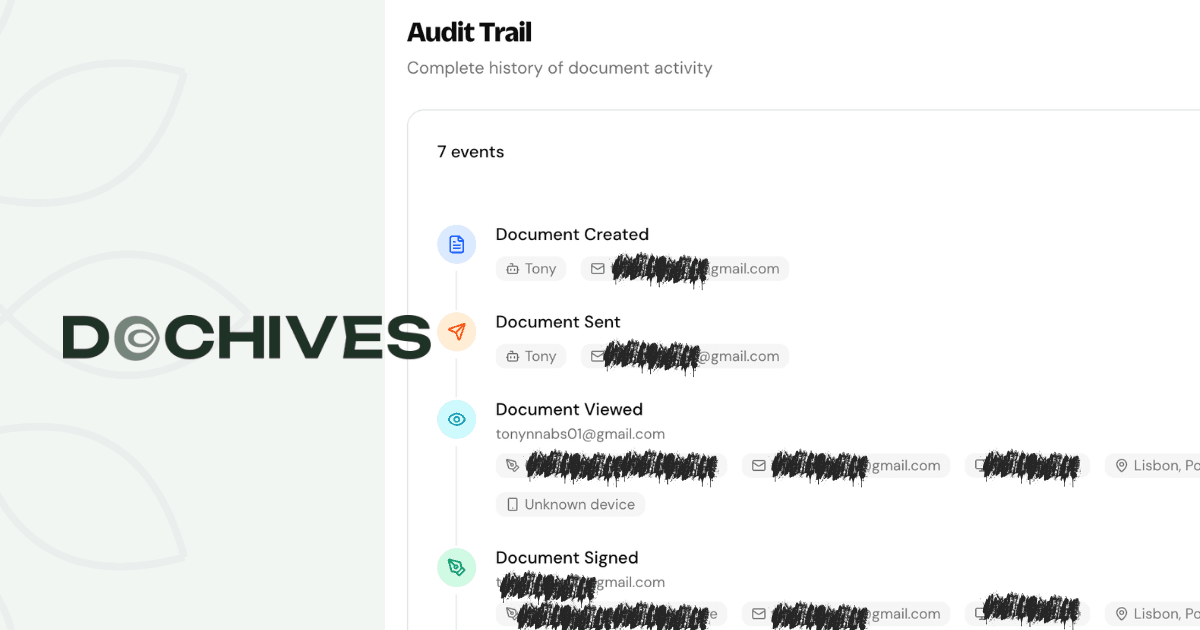
The signature has to be connected to the specific document being signed. This is where the technical implementation matters. A signature that's just a typed name in an email isn't strongly associated with anything. A signature applied through an e-signing platform that embeds it into the document, locks the file, and creates an audit trail is strongly associated.
Courts have generally been lenient about what counts as "association," but stronger association makes for stronger enforceability. The audit trail is the gold standard.
4. Record retention
A copy of the signed document has to be retained and accessible to both parties. If you signed something but neither party has a copy, it's hard to enforce. This is one reason e-signing platforms automatically email signed copies to all parties — it creates the retention required by law.
What good typed signatures look like
A properly captured typed signature includes:
- The signer's full legal name
- A timestamp of when it was applied
- The IP address from which the signature was made
- An identity verification method (email, SMS code, ID check)
- An audit log of every action taken on the document
- Cryptographic protection against post-signing tampering
When all of these elements are present, a typed signature isn't just legally binding — it's often more defensible than a paper signature, because the audit trail is so much more detailed.
"By Typing Your Name You Agree" — How Online Consent Works
You've encountered this pattern hundreds of times. A web form asks for your name. There's a sentence above or below it: "By typing your name below, you agree to the terms above." You type, you submit, you're agreed.
What's actually happening legally? Let me walk through it.
The mechanics of online typed-name consent
When you type your name into a "by typing your name you agree" field, you're executing what lawyers call a clickwrap or sign-in-wrap agreement — variations of which have been repeatedly upheld by U.S. courts for over two decades. Cornell Law's Legal Information Institute has a useful primer on how courts evaluate these agreements.
The law's view of these agreements is relatively simple: if the person had reasonable notice of the terms and took an affirmative action to indicate agreement, they're bound by those terms. Typing your name and clicking "Agree" or "Submit" is a textbook affirmative action.
Why typed-name consent works legally
A few elements make typed-name consent particularly enforceable:
- It's an affirmative act — You can't accidentally type your full name. It requires deliberate action.
- It mirrors traditional signing — Typing your name is conceptually similar to signing your name, which has thousands of years of legal precedent.
- It creates evidence — The act of typing produces a record that can be stored and verified.
- It demonstrates capacity — Someone who can type their name can usually understand they're signing.
Where these forms can fail
Not every "type your name to agree" form is bulletproof. Common failure modes:
- Hidden terms — If the actual contract terms aren't reasonably accessible at the time of signing, courts can find the agreement unenforceable
- Pre-filled names — If the form auto-populates the name and the user just clicks submit, intent gets harder to prove
- Misleading language — If the page makes it unclear that signing creates a binding contract
- Substantial form changes — If the document was dramatically modified after the typing occurred without re-consent
The leading case law — including a long line of decisions in federal courts — has consistently distinguished between agreements where the user actively engaged with the contract terms versus situations where terms were buried or obscured. Active engagement (like having to scroll through and acknowledge the terms before typing your name) creates stronger enforceability.
Best practices for businesses collecting typed-name consent
If you're on the business side of this — collecting typed signatures from customers, employees, or contractors — a few things make your forms more defensible:
- Display the contract terms before the signature field, not buried under a hyperlink
- Require an affirmative action separate from the name field, like checking a box and then typing
- Use clear language ("By typing your name and clicking Submit, you agree to and sign this Agreement")
- Capture timestamps and IP addresses automatically
- Send a confirmation email with a copy of the signed agreement
- Use an established e-signing platform rather than rolling your own form
From the consumer side
If you're typing your name into something, take twenty seconds to actually read what you're agreeing to. Yes, even on the seventeenth click of the day. The law generally doesn't excuse signers from agreements just because they didn't read the terms — and "I didn't realize I was signing something binding" is rarely a winning argument when you typed your full name into a field labeled "Signature."
The /s/ Signature Explained
You may have seen documents — especially court filings and federal forms — with signatures that look like "/s/ Jane Smith" or "s/ John Doe." If you've wondered what those slashes are doing there, you're not alone.
What /s/ means
The /s/ notation is shorthand used to indicate that a document was signed electronically (or via fax, in older usage). It comes from the U.S. federal court system, where the Federal Rules of Civil Procedure and various local rules have long allowed attorneys to file documents electronically using the /s/ format.
Reading "/s/ Jane Smith" essentially means: "This document is signed by Jane Smith — not in handwriting, but electronically, and Jane Smith is the person who authenticated it." It's a textual placeholder for what would otherwise be a handwritten signature.
Where /s/ signatures are used
The /s/ format originated in legal practice and remains common in:
- Federal court filings — Through PACER and CM/ECF systems
- State court filings — Where local rules permit
- Government forms — Particularly forms filed electronically with regulators
- Tax filings — Some IRS forms accept /s/ signatures from preparers
- Formal legal correspondence — Especially when a wet signature isn't practical
/s/ vs. s/ vs. S/
You'll see variations: "/s/", "s/", "S/", and "/S/". Functionally they all mean the same thing — a placeholder indicating an electronic signature. The "/s/" format is the most common and the one prescribed by most federal court systems. The variations come from different jurisdictions and historical practices.
Are /s/ signatures legally binding?
Yes. In the contexts where they're used — particularly court filings — they're explicitly authorized by court rules. The signing attorney is taking responsibility for the filing the same way they would with a wet signature, and the /s/ notation creates a clear record of who signed.
For everyday business contracts outside the legal/court context, the /s/ format isn't strictly necessary. A regular typed name in an e-signing platform is just as enforceable. But if you see /s/ in front of a name on a document, know that it's a long-standing legal convention indicating electronic authorization.
A quick note on attorney signatures
Under federal court rules, when an attorney signs a filing with "/s/", they're certifying multiple things — that they've reviewed the document, that the legal positions taken have a reasonable basis, and that the factual statements have evidentiary support. The /s/ isn't just a signature; it's a sworn certification with real consequences if violated. That's why courts treat /s/ signatures with the same gravity as wet ones.
When a Typed Signature Holds Up in Court (And When It Doesn't)
Theory and practice diverge sometimes. Let me get concrete about when typed signatures actually survive legal challenges and when they crumble.
Cases where typed signatures hold up
Typed signatures hold up reliably when the following conditions are met:
- The signer clearly intended to sign
- The terms were prominently displayed
- An e-signing platform created a complete audit trail
- The agreement involves competent adult parties
- The transaction is the type ESIGN/UETA cover
Real-world examples where typed signatures have been enforced:
- Employment offer letters signed online by new hires
- Vendor agreements executed through DocuSign or similar platforms
- Settlement agreements in commercial disputes
- Software license agreements signed during account creation
- Real estate listing agreements (with some state-specific exceptions)
- Loan documents outside of certain mortgage and consumer credit contexts
Courts generally treat properly captured typed signatures the same as handwritten ones. The American Bar Association has published extensive commentary noting that in modern commercial litigation, electronic signatures are routinely accepted as authentic without special procedural hurdles.
Cases where typed signatures get challenged successfully
Typed signatures get challenged — and sometimes invalidated — when:
- The audit trail is incomplete — No timestamps, IP addresses, or identity verification
- Terms were unconscionable or hidden — Critical terms buried in fine print or behind links
- The signer's identity is in serious doubt — No verification that the signer was who they claimed to be
- There's evidence of fraud — Someone else typed the name without authorization
- Capacity issues exist — The signer was a minor, mentally incapacitated, or coerced
- The document falls into an excluded category — Wills, certain family law documents, etc.
The identity verification problem
The single biggest weakness of basic typed signatures is identity verification. When someone types "John Smith" into a form, how do you know it was actually John Smith? Without verification, you have a name typed by someone — possibly John Smith, possibly his roommate, possibly someone who hacked his email.
This is why serious e-signing platforms verify identity through email confirmation, SMS codes, or government ID checks. Each layer of verification makes the typed signature progressively more defensible. A signature backed by email verification, IP address logging, and timestamp records is much harder to challenge than a bare typed name.
The "I never signed it" defense
The most common challenge to a typed signature is the signer claiming they never signed. Audit trails are how this gets resolved. If the platform can show:
- The document was sent to a verified email address
- The recipient logged in from a specific IP and device
- The signer viewed the document for X minutes before signing
- The signature was applied at a specific timestamp
- The document was downloaded and emailed back
...then the "I never signed it" defense becomes very difficult to maintain. The audit trail effectively reconstructs the signing event.
A practical takeaway
If you're collecting typed signatures from anyone — clients, employees, contractors, customers — your defensibility depends on the technical infrastructure, not just the typed name itself. Use a real e-signing platform that produces a complete audit trail, and your typed signatures will hold up in nearly any context where typed signatures are legally permitted.
Where Typed Signatures Are NOT Legally Binding
Both ESIGN and UETA carve out specific categories of documents where electronic signatures (typed or otherwise) are not legally valid. These exceptions are narrow but important.
The federal exceptions
The ESIGN Act explicitly excludes several categories from electronic signature validity:
- Wills, codicils, and testamentary trusts — Estate planning documents that transfer assets at death typically still require wet signatures and witnesses
- Adoption, divorce, and other family law matters — Most family court documents
- Court orders, notices, and official court documents — Other than filings made through approved electronic systems
- Notices of cancellation or termination of utility services — Specific consumer protection notices
- Notices of default, repossession, foreclosure, or eviction of a primary residence
- Notices of cancellation of health or life insurance benefits
- Product recall notices affecting health or safety
- Documents required to accompany hazardous materials in transportation
State-level exceptions
UETA includes a similar list of exclusions, and states often add their own. Common state-level additions include:
- Certain real estate transfers (some states require wet signatures on deeds)
- Power of attorney documents (varies by state)
- Living wills and advance medical directives
- Some marital agreements
This is why if you're dealing with anything in real estate, family law, or estate planning, you should check the specific state requirements before assuming electronic signatures will work.
Notarization exceptions (which are getting smaller)
Historically, any document requiring notarization was a non-starter for purely electronic signatures because notaries had to physically witness the signing. That's been changing rapidly with the rise of remote online notarization (RON), which most states have now approved. The National Notary Association tracks state-by-state RON adoption.
In states where RON is permitted, even notarized documents can now be fully electronic — including the typed or drawn signature, the notary's seal, and the witnessing process. But you have to use a platform specifically authorized for RON in the relevant state.
Courts and electronic filing
Most courts accept and even require electronic filing for routine submissions. Federal courts use PACER/CM/ECF; state courts use various electronic filing systems. In these contexts, /s/ typed signatures are explicitly authorized for licensed attorneys filing on behalf of clients.
But the court order itself — the judge's signature on a ruling — typically follows different procedures depending on the jurisdiction. And specific court documents (like sworn affidavits or declarations) may still require wet signatures unless the court rules permit electronic alternatives.
What this means for the average business
For 99% of routine business activity — contracts, NDAs, employment agreements, service agreements, vendor agreements, consulting agreements, sales contracts, and similar — typed signatures are fully valid. The exceptions cluster around estate planning, family law, certain consumer notices, and specific court documents. Unless you're operating in those niches, you can safely assume typed signatures work.
Typed Signature vs. Drawn Signature vs. Click-to-Sign
E-signing platforms typically offer multiple ways to sign electronically. Here's how they compare.
Typed signature
You type your name and the platform renders it in a stylized font (sometimes letting you choose between fonts). The result looks like a cursive signature even though you typed letters.
Pros:
- Fast and easy from any device
- Doesn't require fine motor control (good for tablets without styluses)
- Produces clear, readable signatures every time
Cons:
- Looks less personal than a drawn signature
- Can feel "less serious" to some signers, even though it's legally equivalent
- All typed signatures from the same person look identical (no biometric variation)
Drawn signature
You use your finger, mouse, or stylus to draw your signature on a touchscreen or with a pointing device. The platform captures the actual strokes you make.
Pros:
- Looks more like a traditional signature
- Captures biometric data (stroke speed, pressure if available)
- Often feels more "real" to signers
- Matches handwritten signatures on paper documents
Cons:
- Awkward to draw with a mouse
- Hard to draw consistently on small phone screens
- Can produce sloppy results
- Requires more user effort
Click-to-sign
You click a button (often labeled "Sign" or "I Agree") and the platform applies a signature on your behalf based on your authenticated identity.
Pros:
- Fastest possible signing
- Reduces user friction
- Good for low-stakes agreements (terms of service, etc.)
Cons:
- Less obvious that you're signing
- Some courts have scrutinized click-to-sign for ambiguous intent
- Less appropriate for high-value contracts
Are they all equally enforceable?
Legally, all three methods are typically equivalent under ESIGN and UETA. The form doesn't matter — what matters is intent, consent, association, and retention. A click-to-sign on a contract that was clearly displayed and required affirmative action to acknowledge is just as enforceable as a hand-drawn signature.
That said, certain situations call for stronger forms of signature for evidentiary purposes:
- High-value contracts → drawn signatures often preferred for psychological gravity (even though typed is equivalent)
- Routine consents → click-to-sign is usually fine
- Legal documents requiring formality → typed or drawn signatures with full audit trails
A note on drawn signatures and biometrics
When you draw a signature on a touchscreen, some platforms capture additional biometric data — stroke order, speed, pressure, pen lifts. This biometric data can later be used to verify that the same person who has signed similar documents in the past was the one who signed this one. It's a stronger authentication method than a bare typed name, though it's rarely necessary for routine business contracts.
How to Make Sure Your Typed Signature Is Defensible
If you're going to rely on typed signatures — either as a business collecting them or as an individual providing them — a few practices make the difference between enforceable signatures and ones that get challenged successfully.
For businesses collecting typed signatures
Use a real e-signing platform. Don't roll your own. Established platforms produce audit trails, manage retention, handle identity verification, and enforce best practices automatically. The cost is trivial compared to a single contract dispute.
Display contract terms clearly. Don't bury terms behind hyperlinks if you can avoid it. Show them in the signing flow itself, ideally requiring the signer to scroll through them before signing.
Require affirmative action. Beyond just typing the name, require an explicit "I agree" or "Sign" action. The combination of typing plus clicking creates redundant evidence of intent.
Verify identity. At minimum, require the signature link to be sent to a verified email address. For higher-stakes documents, add SMS verification, identity document checks, or other authentication layers.
Capture full audit trails. Timestamps, IP addresses, device information, the order in which fields were completed — all of this should be automatic with any reputable e-signing platform.
Send confirmation copies. Both parties should receive the signed document immediately upon completion. This creates redundant retention and confirms the agreement was successfully captured.
Keep records for the legally required period. Most contracts should be retained for at least the statute of limitations period for breach of contract claims (typically 4 to 6 years, depending on the state). For some categories — tax-related, employment, real estate — retention periods are longer.
For individuals providing typed signatures
Read what you're signing. Sounds basic, but it's the single most-skipped step. The law generally doesn't excuse signers from terms they didn't read.
Use the same name consistently. Type your full legal name, not a nickname. Use the same form across all signed documents.
Get copies. Make sure you receive a signed copy of every document you sign. If the platform doesn't automatically email it, request one.
Know your rights. For consumer transactions, you have specific rights under federal consumer protection laws regarding electronic disclosures. Understand them before signing financial agreements.
When in doubt, escalate
For very high-stakes documents — anything involving substantial money, equity, real estate, or long-term commitments — consider whether a typed signature is actually the right tool. Sometimes a wet signature with notarization is worth the extra effort just for the evidentiary weight. Want to think through the broader question of what your signature can or should be? Our post on whether your signature has to be your name covers the surprisingly flexible legal rules around signature form.
The audit trail is your friend
I want to emphasize this one more time because it's that important: the audit trail is what makes typed signatures defensible. Without one, you have a typed name. With one, you have a forensic record of exactly when, where, how, and by whom the document was signed. The difference in legal weight is enormous.
People Also Ask
By typing your name you agree online — what does this actually mean?
When you see "by typing your name you agree" on a website, you're being asked to provide an electronic signature — and yes, typing your name into that box is legally binding under U.S. law (specifically ESIGN and UETA). The act of typing your name constitutes signing the agreement, which means you're bound by the terms displayed. The agreement is enforceable as long as you had reasonable notice of the terms, took affirmative action to indicate consent, and the document is preserved. It's not a marketing trick — it's a real signature.
What is an /s/ signature and is it legally valid?
An /s/ signature is a textual notation (like "/s/ Jane Smith") used to indicate that a document was signed electronically rather than in handwriting. It originated in federal court filings, where the Federal Rules of Civil Procedure expressly allow attorneys to sign documents this way through electronic filing systems. /s/ signatures are legally valid in the contexts where they're used — court filings, government forms, formal legal correspondence — and carry the same legal weight as handwritten signatures. For routine business contracts, the /s/ format isn't necessary, but it's perfectly acceptable.
Can you reject a typed signature in a contract dispute?
You can challenge a typed signature, but rejecting one outright is difficult unless specific defects exist. Successful challenges usually involve issues like fraud, lack of identity verification, hidden contract terms, lack of capacity (e.g., the signer was a minor), or the document falling into an ESIGN-excluded category. A typed signature backed by a complete audit trail — timestamps, IP addresses, identity verification, intent indicators — is generally treated by courts the same as a handwritten one. Without specific grounds for challenge, "I don't believe in typed signatures" isn't a winning argument.
Wrapping It All Up
Typing your name to sign a document isn't a shortcut or a workaround — it's a fully legitimate signature method recognized by federal and state law for over twenty years. Under the ESIGN Act and UETA, a typed signature carries the same legal force as a handwritten one, provided four conditions are met: intent to sign, consent to electronic transactions, association with the document, and proper record retention.
The legal infrastructure that supports typed signatures is more robust than most people realize. With proper identity verification and a complete audit trail, an electronically captured typed signature is often more defensible than a paper one — because the digital evidence is so much more thorough. The exceptions where electronic signatures aren't valid (wills, certain family law matters, specific consumer notices) are narrow and well-defined.
If you take one thing away from this post: the form of the signature matters far less than the process around it. A casual typed name in an unsecured email may be technically valid but practically vulnerable. A typed name applied through a real e-signing platform with audit trails, verification, and tamper protection is rock-solid. Choose your tools accordingly.
Want more deep-dives on signatures, contracts, and document workflows? Check out the rest of the Dochives blog — we cover everything from electronic signature legality to industry-specific contract templates. And when you're ready to send and sign your first document with audit-trail-backed protection, try Dochives free — your first signed document is just minutes away.